#34833: "Board positioning: avoid requiring scrolling where possible"
รายงานนี้เกี่ยวกับอะไร?
เกิดอะไรขึ้น? กรุณาเลือกจากด้านล่าง
เกิดอะไรขึ้น? กรุณาเลือกจากด้านล่าง
โปรดตรวจสอบว่ามีรายงานในหัวข้อเดียวกันอยู่แล้ว
ถ้าใช่โปรดโหวตสำหรับรายงานนี้ รายงานที่ได้รับคะแนนโหวตมากที่สุดจะได้รับลำดับความสำคัญสูง!
| # | Status | Votes | Game | Type | Title | Last update |
|---|
คำอธิบายโดยละเอียด
-
• โปรดคัดลอก / วางข้อความแสดงข้อผิดพลาดที่คุณเห็นบนหน้าจอหากมี
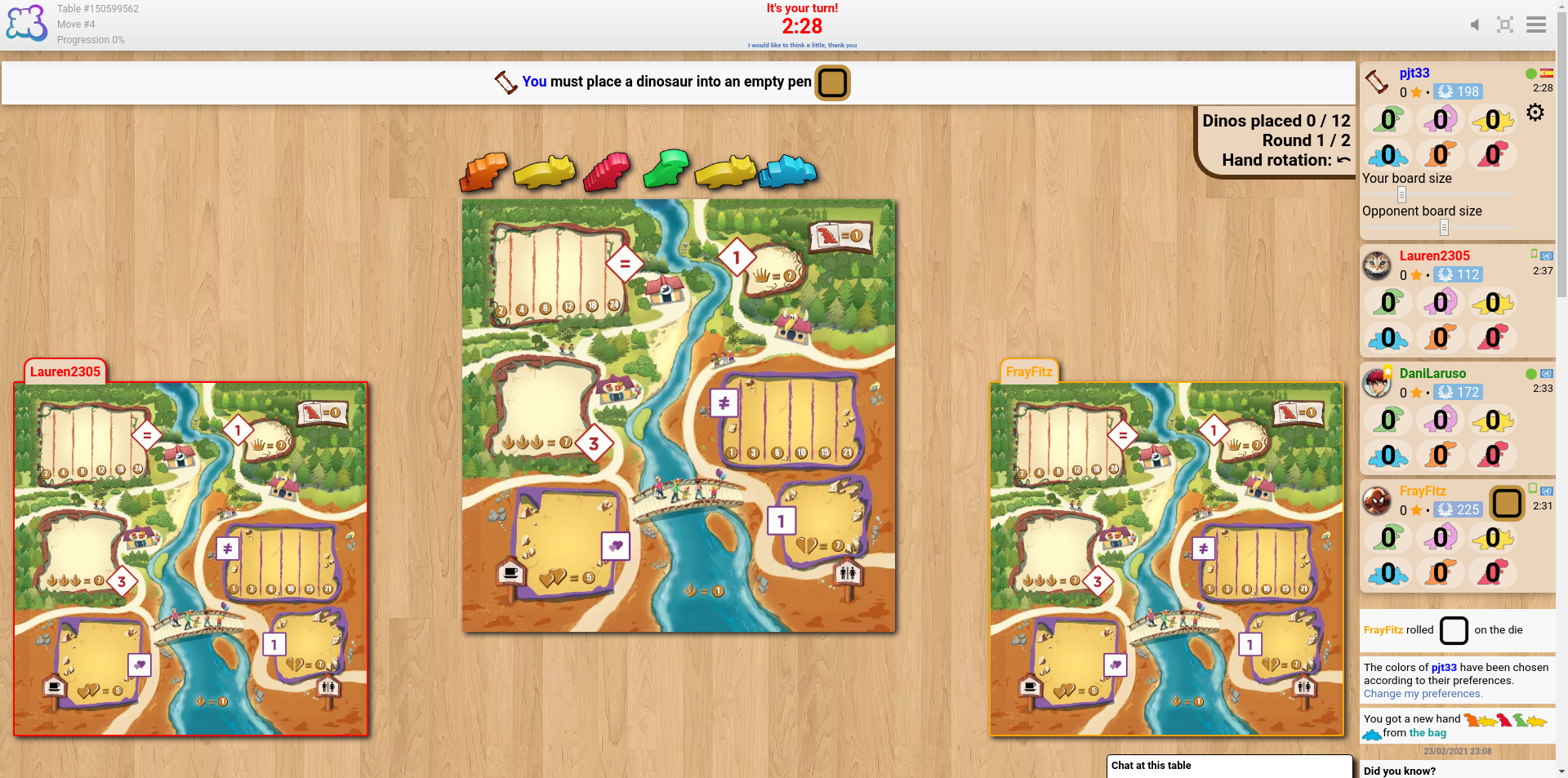
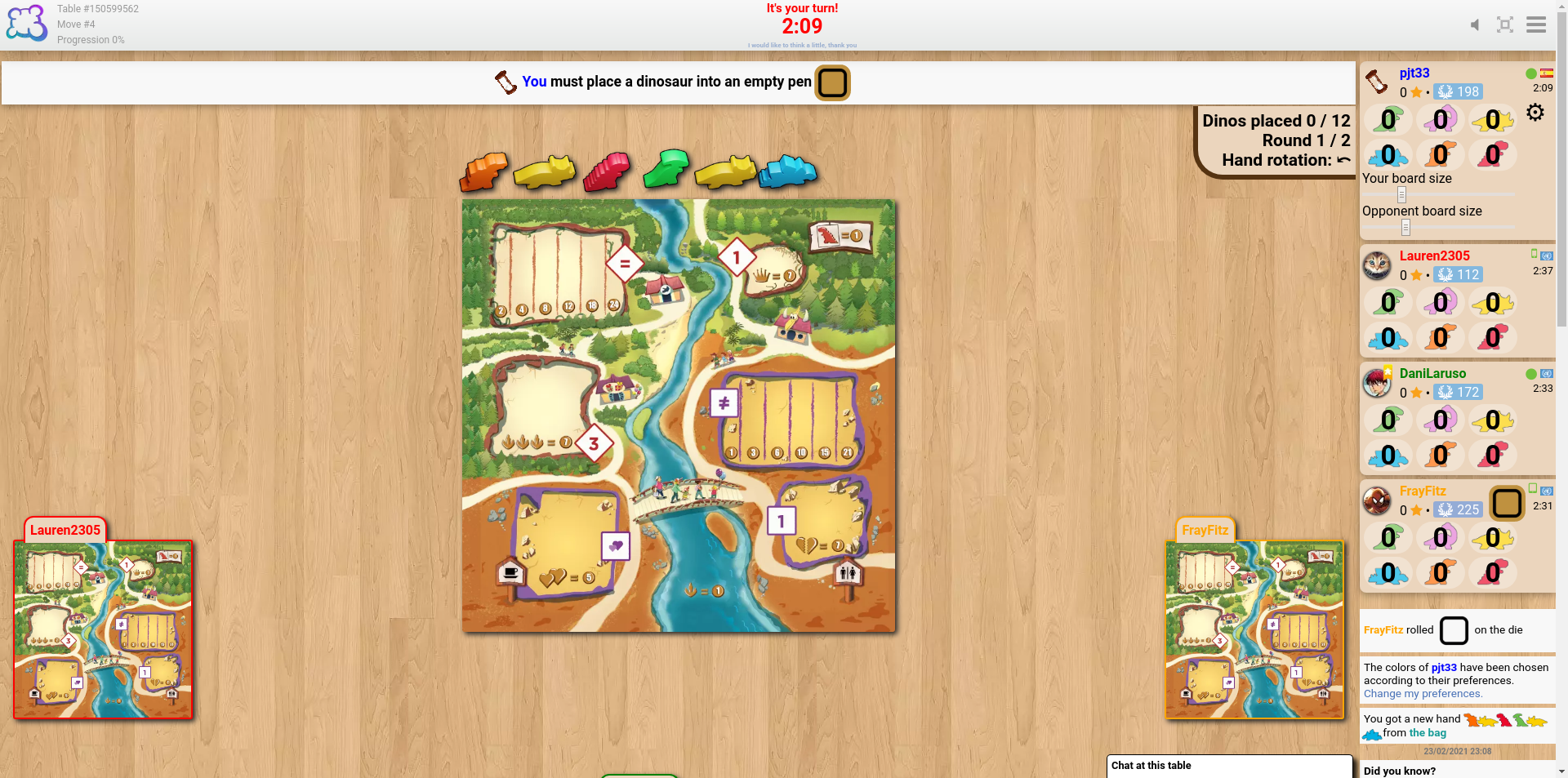
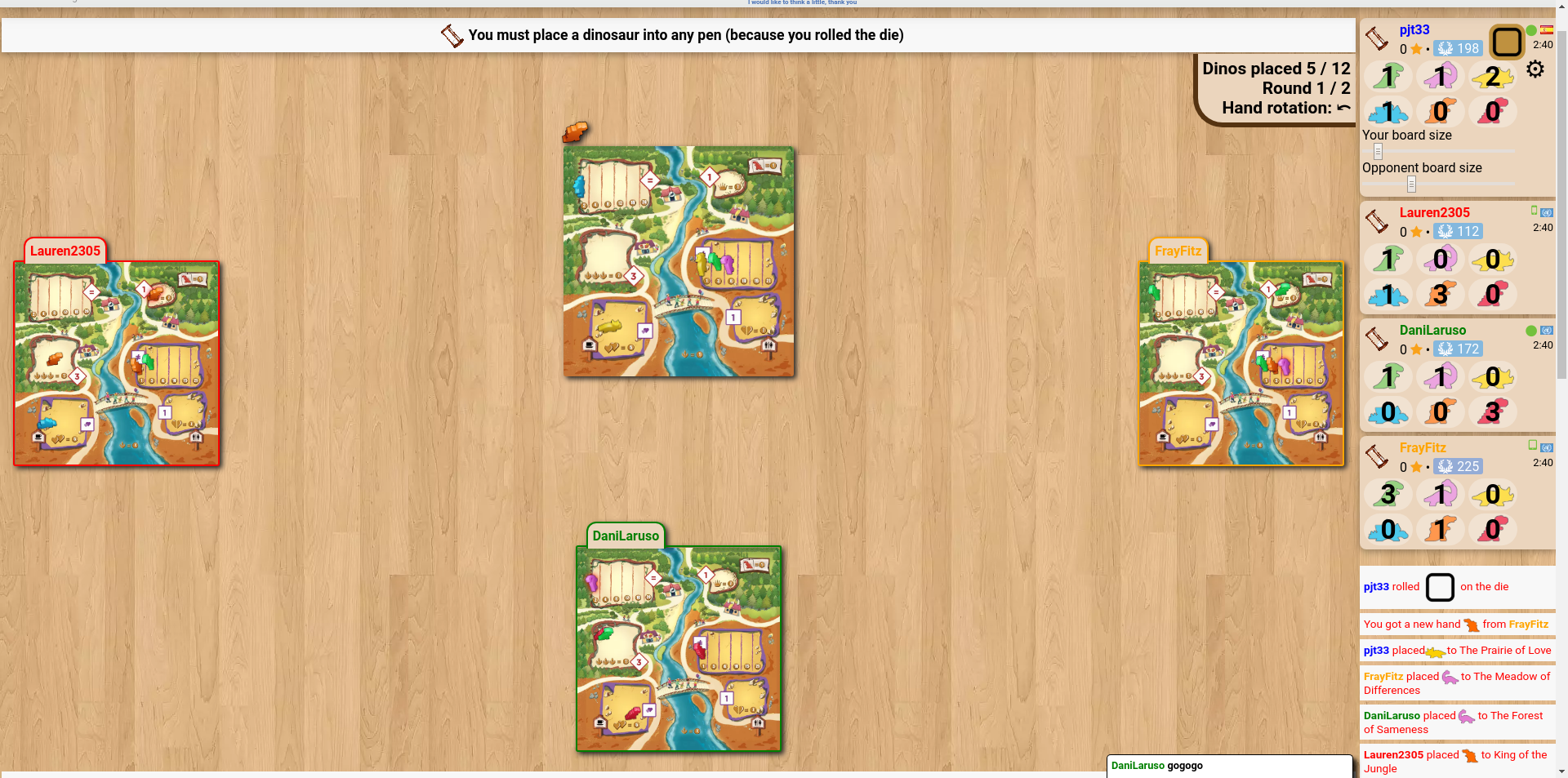
The sliders to change the sizes of the boards seem like a good idea, but my experience of trying to find a suitable size is that the problem isn't the board size but their position. It seems that the boards of the players to my left and right align with the bottom of the screen, and the boards of the fourth (and fifth, if applicable) player(s) go below the bottom of the screen unless using really tiny sizes.
cheddarmonk.org/forumimg/draftosaurus-initial-sizes.png and cheddarmonk.org/forumimg/draftosaurus-aligns-bottom.png show how making the opponent boards smaller pushes them down.
cheddarmonk.org/forumimg/draftosaurus-fixed-margin.png was the best that I could manage to get the boards to fit on screen without scrolling, and even then I had to scroll down a little and lose some of the header. This is with a maximised browser window on a 1920x1080 screen.
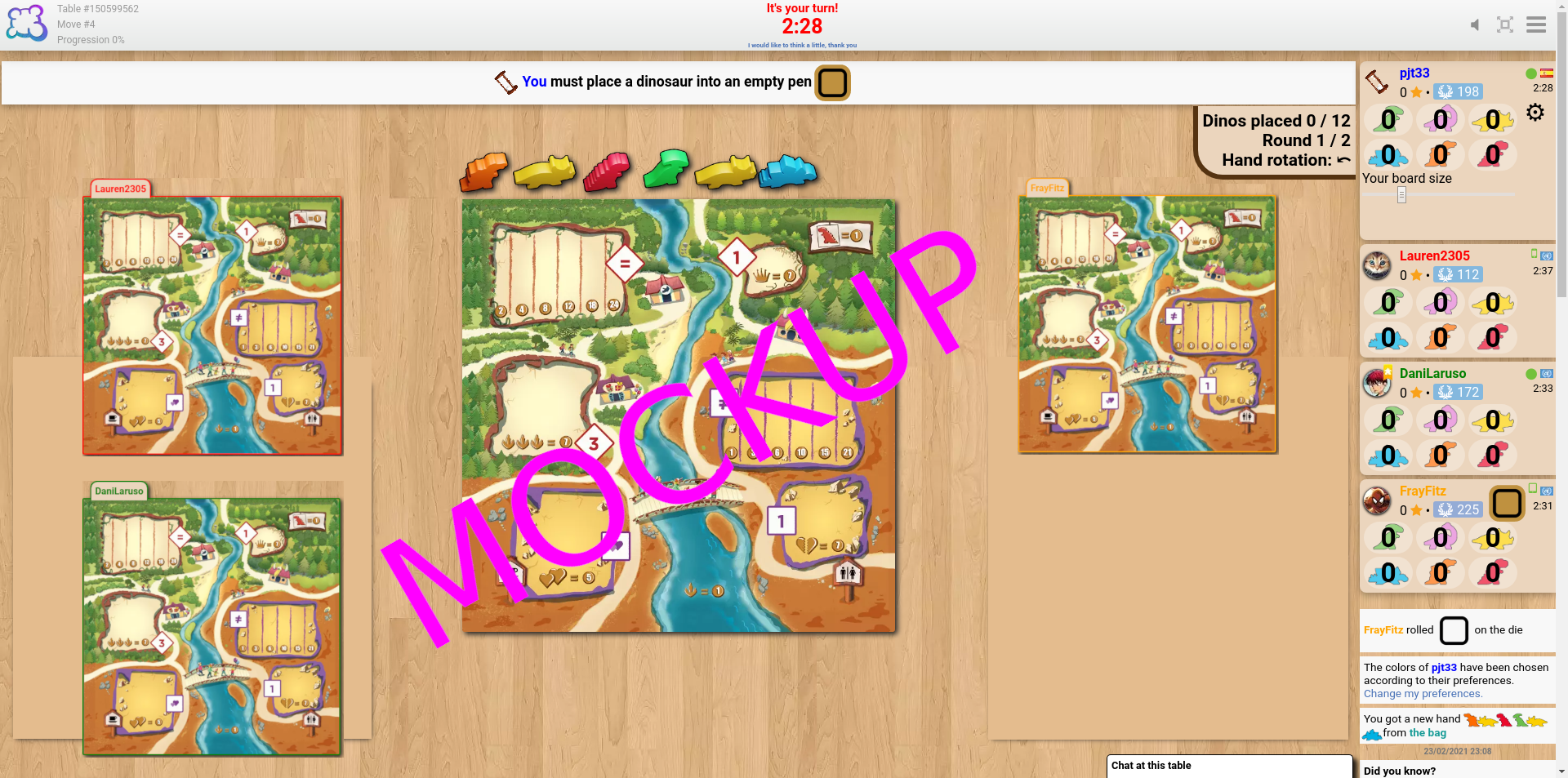
For desktop I think that it would work to have just one slider, for my own board size, and to fit the opponent boards into the left and right margins by calculating the scale factor which lets them both fit vertically, and the scale factor which lets them fit horizontally, and choosing the smaller of the two. I've made a mockup at cheddarmonk.org/forumimg/draftosaurus-mockup.png which shows how much larger the boards can be without scrolling. -
• โปรดอธิบายสิ่งที่คุณต้องการจะทำสิ่งที่คุณทำและสิ่งที่เกิดขึ้น
• คุณใช้เบราว์เซอร์อะไร?
Google Chrome v79
-
• โปรดคัดลอก / วางข้อความที่แสดงเป็นภาษาอังกฤษแทนภาษาของคุณ ถ้าคุณมีภาพที่ติดปัญหาบัค คุณสามารถใช้เว็บฝากรูปภาพใดก็ได้ (snipboard.io for example) เพื่ออัพโหลดรูปภาพนั้น จากนั้นนำลิงค์ภาพมาวางที่นี่ ข้อความนี้มีอยู่ใน ระบบการแปล หรือไม่? ถ้าใช่มันแปลมานานกว่า 24 ชั่วโมงแล้วหรือยัง?
The sliders to change the sizes of the boards seem like a good idea, but my experience of trying to find a suitable size is that the problem isn't the board size but their position. It seems that the boards of the players to my left and right align with the bottom of the screen, and the boards of the fourth (and fifth, if applicable) player(s) go below the bottom of the screen unless using really tiny sizes.
cheddarmonk.org/forumimg/draftosaurus-initial-sizes.png and cheddarmonk.org/forumimg/draftosaurus-aligns-bottom.png show how making the opponent boards smaller pushes them down.
cheddarmonk.org/forumimg/draftosaurus-fixed-margin.png was the best that I could manage to get the boards to fit on screen without scrolling, and even then I had to scroll down a little and lose some of the header. This is with a maximised browser window on a 1920x1080 screen.
For desktop I think that it would work to have just one slider, for my own board size, and to fit the opponent boards into the left and right margins by calculating the scale factor which lets them both fit vertically, and the scale factor which lets them fit horizontally, and choosing the smaller of the two. I've made a mockup at cheddarmonk.org/forumimg/draftosaurus-mockup.png which shows how much larger the boards can be without scrolling. • คุณใช้เบราว์เซอร์อะไร?
Google Chrome v79
-
• โปรดอธิบายข้อเสนอแนะของคุณอย่างแม่นยำและรัดกุมเพื่อให้ง่ายที่สุดที่จะเข้าใจสิ่งที่คุณหมายถึง
The sliders to change the sizes of the boards seem like a good idea, but my experience of trying to find a suitable size is that the problem isn't the board size but their position. It seems that the boards of the players to my left and right align with the bottom of the screen, and the boards of the fourth (and fifth, if applicable) player(s) go below the bottom of the screen unless using really tiny sizes.
cheddarmonk.org/forumimg/draftosaurus-initial-sizes.png and cheddarmonk.org/forumimg/draftosaurus-aligns-bottom.png show how making the opponent boards smaller pushes them down.
cheddarmonk.org/forumimg/draftosaurus-fixed-margin.png was the best that I could manage to get the boards to fit on screen without scrolling, and even then I had to scroll down a little and lose some of the header. This is with a maximised browser window on a 1920x1080 screen.
For desktop I think that it would work to have just one slider, for my own board size, and to fit the opponent boards into the left and right margins by calculating the scale factor which lets them both fit vertically, and the scale factor which lets them fit horizontally, and choosing the smaller of the two. I've made a mockup at cheddarmonk.org/forumimg/draftosaurus-mockup.png which shows how much larger the boards can be without scrolling. • คุณใช้เบราว์เซอร์อะไร?
Google Chrome v79
-
• สิ่งที่ปรากฏบนหน้าจอเมื่อคุณถูกบล็อก (หน้าจอว่างเปล่าส่วนหนึ่งของอินเตอร์เฟซเกมข้อความผิดพลาด?)
The sliders to change the sizes of the boards seem like a good idea, but my experience of trying to find a suitable size is that the problem isn't the board size but their position. It seems that the boards of the players to my left and right align with the bottom of the screen, and the boards of the fourth (and fifth, if applicable) player(s) go below the bottom of the screen unless using really tiny sizes.
cheddarmonk.org/forumimg/draftosaurus-initial-sizes.png and cheddarmonk.org/forumimg/draftosaurus-aligns-bottom.png show how making the opponent boards smaller pushes them down.
cheddarmonk.org/forumimg/draftosaurus-fixed-margin.png was the best that I could manage to get the boards to fit on screen without scrolling, and even then I had to scroll down a little and lose some of the header. This is with a maximised browser window on a 1920x1080 screen.
For desktop I think that it would work to have just one slider, for my own board size, and to fit the opponent boards into the left and right margins by calculating the scale factor which lets them both fit vertically, and the scale factor which lets them fit horizontally, and choosing the smaller of the two. I've made a mockup at cheddarmonk.org/forumimg/draftosaurus-mockup.png which shows how much larger the boards can be without scrolling. • คุณใช้เบราว์เซอร์อะไร?
Google Chrome v79
-
• ส่วนใดของกฎที่ไม่ได้รับความเคารพจากการปรับตัวด้วย BGA
The sliders to change the sizes of the boards seem like a good idea, but my experience of trying to find a suitable size is that the problem isn't the board size but their position. It seems that the boards of the players to my left and right align with the bottom of the screen, and the boards of the fourth (and fifth, if applicable) player(s) go below the bottom of the screen unless using really tiny sizes.
cheddarmonk.org/forumimg/draftosaurus-initial-sizes.png and cheddarmonk.org/forumimg/draftosaurus-aligns-bottom.png show how making the opponent boards smaller pushes them down.
cheddarmonk.org/forumimg/draftosaurus-fixed-margin.png was the best that I could manage to get the boards to fit on screen without scrolling, and even then I had to scroll down a little and lose some of the header. This is with a maximised browser window on a 1920x1080 screen.
For desktop I think that it would work to have just one slider, for my own board size, and to fit the opponent boards into the left and right margins by calculating the scale factor which lets them both fit vertically, and the scale factor which lets them fit horizontally, and choosing the smaller of the two. I've made a mockup at cheddarmonk.org/forumimg/draftosaurus-mockup.png which shows how much larger the boards can be without scrolling. -
• การละเมิดกฎสามารถมองเห็นได้ในการเล่นซ้ำเกมหรือไม่ ถ้าใช่จะย้ายเบอร์ไหน
• คุณใช้เบราว์เซอร์อะไร?
Google Chrome v79
-
• แอคชั่นเกมใดที่คุณอยากใช้งาน?
The sliders to change the sizes of the boards seem like a good idea, but my experience of trying to find a suitable size is that the problem isn't the board size but their position. It seems that the boards of the players to my left and right align with the bottom of the screen, and the boards of the fourth (and fifth, if applicable) player(s) go below the bottom of the screen unless using really tiny sizes.
cheddarmonk.org/forumimg/draftosaurus-initial-sizes.png and cheddarmonk.org/forumimg/draftosaurus-aligns-bottom.png show how making the opponent boards smaller pushes them down.
cheddarmonk.org/forumimg/draftosaurus-fixed-margin.png was the best that I could manage to get the boards to fit on screen without scrolling, and even then I had to scroll down a little and lose some of the header. This is with a maximised browser window on a 1920x1080 screen.
For desktop I think that it would work to have just one slider, for my own board size, and to fit the opponent boards into the left and right margins by calculating the scale factor which lets them both fit vertically, and the scale factor which lets them fit horizontally, and choosing the smaller of the two. I've made a mockup at cheddarmonk.org/forumimg/draftosaurus-mockup.png which shows how much larger the boards can be without scrolling. -
• คุณพยายามทำอะไรเพื่อกระตุ้นการกระทำของเกมนี้?
-
• เกิดอะไรขึ้นเมื่อคุณพยายามทำสิ่งนี้ (ข้อความแสดงข้อผิดพลาดข้อความแถบสถานะของเกม ... )?
• คุณใช้เบราว์เซอร์อะไร?
Google Chrome v79
-
• ปัญหาเกิดขึ้นที่ขั้นตอนใดของเกม (คำสั่งเกมปัจจุบันคืออะไร)
The sliders to change the sizes of the boards seem like a good idea, but my experience of trying to find a suitable size is that the problem isn't the board size but their position. It seems that the boards of the players to my left and right align with the bottom of the screen, and the boards of the fourth (and fifth, if applicable) player(s) go below the bottom of the screen unless using really tiny sizes.
cheddarmonk.org/forumimg/draftosaurus-initial-sizes.png and cheddarmonk.org/forumimg/draftosaurus-aligns-bottom.png show how making the opponent boards smaller pushes them down.
cheddarmonk.org/forumimg/draftosaurus-fixed-margin.png was the best that I could manage to get the boards to fit on screen without scrolling, and even then I had to scroll down a little and lose some of the header. This is with a maximised browser window on a 1920x1080 screen.
For desktop I think that it would work to have just one slider, for my own board size, and to fit the opponent boards into the left and right margins by calculating the scale factor which lets them both fit vertically, and the scale factor which lets them fit horizontally, and choosing the smaller of the two. I've made a mockup at cheddarmonk.org/forumimg/draftosaurus-mockup.png which shows how much larger the boards can be without scrolling. -
• เกิดอะไรขึ้นเมื่อคุณพยายามทำการกระทำของเกม (ข้อความแสดงข้อผิดพลาดข้อความแถบสถานะเกม, ... )
• คุณใช้เบราว์เซอร์อะไร?
Google Chrome v79
-
• โปรดอธิบายปัญหาการแสดงผล ถ้าคุณมีภาพที่ติดปัญหาบัค คุณสามารถใช้เว็บฝากรูปภาพใดก็ได้ (snipboard.io for example) เพื่ออัพโหลดรูปภาพนั้น จากนั้นนำลิงค์ภาพมาวางที่นี่
The sliders to change the sizes of the boards seem like a good idea, but my experience of trying to find a suitable size is that the problem isn't the board size but their position. It seems that the boards of the players to my left and right align with the bottom of the screen, and the boards of the fourth (and fifth, if applicable) player(s) go below the bottom of the screen unless using really tiny sizes.
cheddarmonk.org/forumimg/draftosaurus-initial-sizes.png and cheddarmonk.org/forumimg/draftosaurus-aligns-bottom.png show how making the opponent boards smaller pushes them down.
cheddarmonk.org/forumimg/draftosaurus-fixed-margin.png was the best that I could manage to get the boards to fit on screen without scrolling, and even then I had to scroll down a little and lose some of the header. This is with a maximised browser window on a 1920x1080 screen.
For desktop I think that it would work to have just one slider, for my own board size, and to fit the opponent boards into the left and right margins by calculating the scale factor which lets them both fit vertically, and the scale factor which lets them fit horizontally, and choosing the smaller of the two. I've made a mockup at cheddarmonk.org/forumimg/draftosaurus-mockup.png which shows how much larger the boards can be without scrolling. • คุณใช้เบราว์เซอร์อะไร?
Google Chrome v79
-
• โปรดคัดลอก / วางข้อความที่แสดงเป็นภาษาอังกฤษแทนภาษาของคุณ ถ้าคุณมีภาพที่ติดปัญหาบัค คุณสามารถใช้เว็บฝากรูปภาพใดก็ได้ (snipboard.io for example) เพื่ออัพโหลดรูปภาพนั้น จากนั้นนำลิงค์ภาพมาวางที่นี่ ข้อความนี้มีอยู่ใน ระบบการแปล หรือไม่? ถ้าใช่มันแปลมานานกว่า 24 ชั่วโมงแล้วหรือยัง?
The sliders to change the sizes of the boards seem like a good idea, but my experience of trying to find a suitable size is that the problem isn't the board size but their position. It seems that the boards of the players to my left and right align with the bottom of the screen, and the boards of the fourth (and fifth, if applicable) player(s) go below the bottom of the screen unless using really tiny sizes.
cheddarmonk.org/forumimg/draftosaurus-initial-sizes.png and cheddarmonk.org/forumimg/draftosaurus-aligns-bottom.png show how making the opponent boards smaller pushes them down.
cheddarmonk.org/forumimg/draftosaurus-fixed-margin.png was the best that I could manage to get the boards to fit on screen without scrolling, and even then I had to scroll down a little and lose some of the header. This is with a maximised browser window on a 1920x1080 screen.
For desktop I think that it would work to have just one slider, for my own board size, and to fit the opponent boards into the left and right margins by calculating the scale factor which lets them both fit vertically, and the scale factor which lets them fit horizontally, and choosing the smaller of the two. I've made a mockup at cheddarmonk.org/forumimg/draftosaurus-mockup.png which shows how much larger the boards can be without scrolling. • คุณใช้เบราว์เซอร์อะไร?
Google Chrome v79
-
• โปรดอธิบายข้อเสนอแนะของคุณอย่างแม่นยำและรัดกุมเพื่อให้ง่ายที่สุดที่จะเข้าใจสิ่งที่คุณหมายถึง
The sliders to change the sizes of the boards seem like a good idea, but my experience of trying to find a suitable size is that the problem isn't the board size but their position. It seems that the boards of the players to my left and right align with the bottom of the screen, and the boards of the fourth (and fifth, if applicable) player(s) go below the bottom of the screen unless using really tiny sizes.
cheddarmonk.org/forumimg/draftosaurus-initial-sizes.png and cheddarmonk.org/forumimg/draftosaurus-aligns-bottom.png show how making the opponent boards smaller pushes them down.
cheddarmonk.org/forumimg/draftosaurus-fixed-margin.png was the best that I could manage to get the boards to fit on screen without scrolling, and even then I had to scroll down a little and lose some of the header. This is with a maximised browser window on a 1920x1080 screen.
For desktop I think that it would work to have just one slider, for my own board size, and to fit the opponent boards into the left and right margins by calculating the scale factor which lets them both fit vertically, and the scale factor which lets them fit horizontally, and choosing the smaller of the two. I've made a mockup at cheddarmonk.org/forumimg/draftosaurus-mockup.png which shows how much larger the boards can be without scrolling. • คุณใช้เบราว์เซอร์อะไร?
Google Chrome v79
ประวัติการรายงาน
I think laying our the boards in the same way as the game Lucky Numbers would be beneficial, as all of the boards are the same size and can be viewed at once without either resizing or scrolling.
เพิ่มการร้องเรียน
- ID ของโต๊ะอื่น / ID ของตาเดิน
- การกด F5 แก้ไขปัญหาหรือไม่
- ปัญหาเกิดขึ้นหลายครั้งหรือไม่ ทุกเวลา? สุ่ม?
- ถ้าคุณมีภาพที่ติดปัญหาบัค คุณสามารถใช้เว็บฝากรูปภาพใดก็ได้ (snipboard.io for example) เพื่ออัพโหลดรูปภาพนั้น จากนั้นนำลิงค์ภาพมาวางที่นี่